Blog

Top VR Games for Android

VR Games have evolved ever since 2012. No need for hi-tech gears and multiple screen projection room. With the advancement of technology, you can use your compact gaming gears and enjoy the world of virtual reality.

Top VR Games for Android- Our Picks!

InCell VR

InCell VR game is the best combination of action and racing games. The game is available in Google Play and can be played with Cardboard set. If you are someone new to VR games, then InCell VR is the best way to start with. The game shrinks you to the microscopic world of human cells and puts you in the year 2134 when the human race gets the ability to shrink.

Vanguard V

Vanguard V is an action-packed game that makes you sole defender against the enemy that is Parasites. The game is designed with different settings and backgrounds like space, earth core, and earth surface. The game is a high-speed game with action and adventures. Perfect for people who need to jump from their sofas while playing.

VR Planet Defence

Another Cardboard game for virtual reality lovers. VR Planet Defence is based in Galaxy where the small planet has been living for quite a long time. The planet was nice and beautiful until it becomes a threat. You can destroy meteors and enemies with a look. The game needs you to move your neck to play, so its an exercise too! It requires you to capture health kit and heal the planet.

BattleZ VR

The first multi-player game in the Android platform is filled with action and adventure. You can play this game with your friends, to save your home from the invasion of zombies. The game is based on person shooting, that means you can shoot your friends too in the game. An irony, you get extra points to turn your backs to your friends.

Top Remote Access Software for PC

Remote Access Software is an app that allows you to control one PC from another computer. It is beneficial when you need to extract information from your office desktop from somewhere else. For access your PC remotely you can use before mentioned Remote Access Software.

Remote Access software comes along with host+viewer combo file. When you want to access a computer remotely, you must download the host file in the network which you would require to obtain, and the viewer files in the computer through which you will access.

Our Top Picks

Remote Utilities-

Remote Utilities software is a very popular software that connects two PC with an Internet ID. Just download and set up the files in the PC and you can access your PC from anywhere. This software is easy to use and does not require port change settings. It lets you connect with up to 10 PCs for free.

Chrome remote desktop

This software is an extension of Google Chrome which lets you access to the PC which is not logged in. It is a good option when you want to access files from the computer at home to your office. The software supports multi-monitor access and installs in a jiffy.

UltraVNC

UltraVNC is a modern age remote access software that allows connecting with the PC from any source like mobile, another computer and also browser. Simply download the host side and viewer side programs in the PCs, and you are using the software.

AeroAdmin

AeroAdmin is the best option for spontaneous remote access to the computer. The software is very simple to use and do not require any extra settings. Just install the file, and you can connect to the PC. You can transfer data remotely and reboot the system from a remote distance.

link cloaking and how to do it

What is Link Cloaking and Best way to do it – 2022

Link cloaking is a process in which you make your URL or Affiliate URLs short, beautiful and user friendly.

Use of Link Cloaking

if you are an Affiliate Marketer, who provides links in there blogs, videos or social media handles. The original link for the product may be a messy url, for example below is a link for Microphone

https://www.amazon.in/Monk-Who-Sold-His-Ferrari/dp/817992162X?pd_rd_w=ovoN3&content-id=amzn1.sym.d3163d45-cad5-462b-8a7b-a5eb87482d2c&pf_rd_p=d3163d45-cad5-462b-8a7b-a5eb87482d2c&pf_rd_r=QHSD1J2RPSP7368WAZR3&pd_rd_wg=dpW2X&pd_rd_r=2070838a-7b28-498e-8bad-83c15ed10d38&pd_rd_i=817992162X&psc=1&linkCode=ll1&tag=thebrownbag-21&linkId=86f1f51b3b951165e0a97118fcd61570&language=en_IN&ref_=as_li_ss_tl

Instead of this if you see the below link:

https://thebrownbag.in/the-monk-who-sold-his-ferrari

which one you are gonna click the messy one or clean one. The goal of link cloaking is to create URLs that are easier to remember and share.

Link cloaking also helps if the product is discontinued or out of stock so you can easily change the target url without changing the link you put in the first place for user.

How to do free link cloaking in wordpress

WordPress is best in terms of handling the website. Because of it’s themes, easy to use plugins. So for link cloaking there are multiple plugins but one I trust is Pretty Links.

Pretty links is available in both free and paid version. In free version you get the basic setting like 301,302 and 307 redirection.

How to use Pretty Links

Choose type of redirection temporary or permanent

Then fill the target url where your user will land and fill the text you want your users to see.

Also Read: Best Free WordPress Website Builder [2021]

What is SEO and Best ways to do it – 2022

SEO or Search engine optimization is the practice of creating or modifying your content according search engine.

We do search engine optimization seo that we can improve our website ranking in the views of search engine.

we create content whether it is a blog post or a youtube video or Instagram reel and many more. But what is the use of this if no one is going to watch our content.

We create content either for entertainment, to answer question or to share what you know. But how people are going to visit your content, either we are going to pay for the traffic or we modify our content according to needs of user.

Type of SEO-

On Page SEO:

On page SEO is the process in which you optimize your content which is visible on page.

  1. Title tag – explain what is the post about in your title tag
  2. URL- URL of your post or page must be descriptive and short. If it easier put your focus keyword in your url.
  3. Meta Description – meta descrition is the brief of your post, we use it to show the context of your post.
  4. Optimize your images – properly name your images and must use Alt text.

Off Page SEO- just like On page SEO works on visual side of your website, Off Page SEO work on behind the scenes of your blog or website.

off page seo creates the authority for your website.

Categories SEO

Free website Downloader for offline Browsing

We all use websites for downloading content, to gain knowledge, for entertainment and so on. some of these websites are some of these websites are static some of them are dynamic static website doesn’t update content regularly but a dynamic website does sometimes you may need a website for there code for your reference or you want to visit the website offline we are going to discuss a free website downloader tool using which you can download a website for offline use.

Using this tool you can download the static or dynamic website both you will get almost all the files you need for website up and running you won’t get the back end data as this data is stored in database other than that the website you have downloaded will be running very smoothly

This tool takes time to download according the website size.

The name of the tool is HTTrack and you can download this for free. HTTrack is a free (GPL, libre/free software) and easy-to-use offline browser utility..

How to Download Free Website Downloader- HTTrack

To download HTTrack Click on the download link. It will take you to the HTTrack website

What is the size of HTTrack

The software is very small size around 5 Mb so you don’t need to worry about the size it is gonna take in you hard drive.

How to Download website using HTTrack

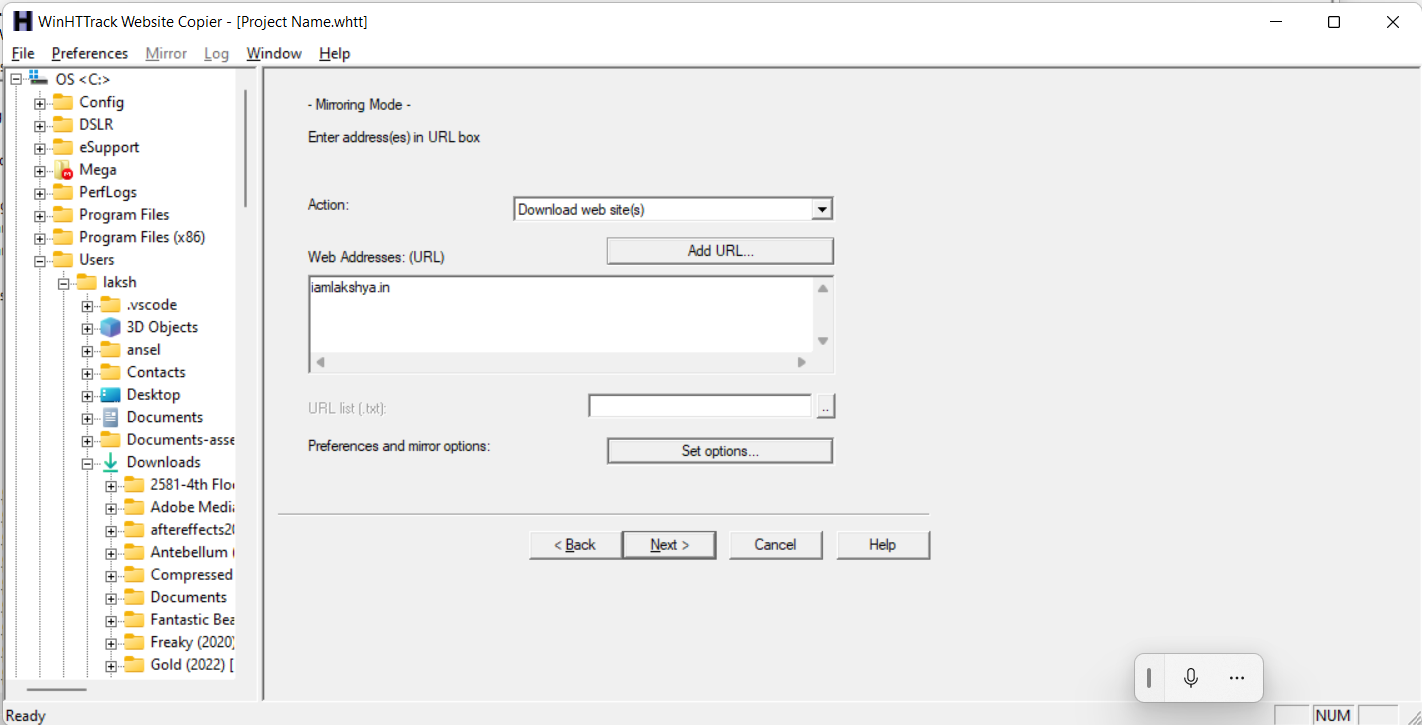
Open HTTrack, Provide Name of the website or name you want for your folder, provide catagory (optional), and choose the location for website files.

Watch this video for the process:

Best Free Themes For WordPress 2022 | eCommerce

Best Free Themes For WordPress

Best Free Themes For WordPress

WordPress is the one of the best platform for creating your website. It is easy to work with wordpress as you can easily manage your website and update it on the go. Most of the times you don’t need to know any coding knowledge as the plugins work the most work for you. (but you must learn programming languages as you upgrade).

It is easy to work with wordpress if you are creating website because there is a large repository of themes on wordpress. Which you can use according to the nature of website. 

Today we are going to talk about the Best Free Themes For WordPress which are free (premium version also available) which are easy to customize and you can change the look of your website. All these themes work with Visual Editor Elementor.

We are going to talk about the Best Free Themes For WordPress today

1. One of the best theme is Generate Press you can easily edit the website using this theme. You get multiple layouts available for various industries.

The theme is available in both free and premium versions.

2. 2nd theme is Ocean WP you can get this for free with multiple demos and 1 Click installation

3. Astra is one of the best themes for wordpress which you can use for you different designs.

Best Free WordPress Website Builder [2022]

Your are here becuase you were searching for Best Free WordPress Website Builder. You need a blog/website, but you don’t know how to code and you don’t have the budget to Hire a Developer. Either you go with Blogger or wordpress.com where you don’t have to do much and you can have a blog easily. But what if you need a professional website that looks good and you can work around easily.

At the current scenario WordPress is the best platform to create a website easily. You buy domain and hosting and install the wordpress and you can choose Themes according to your niche.

Then if you need to customize the blog/website accordingly, either you code. But if you not comfortable with coding.

Here comes the role of WordPress Website Builders.

What are Website builders?

Website builders are programs you use to create a website. You just drag and drop the element and you keep creating pages. you can create a complete website without knowing any code (you should learn coding too, it’s really helpful for small customizations).

There are multiple website builders available. Some themes also come with there own website builders. Like Divi Builder, Themify builder. Let’s check some more best free wordpress website builder.

Best Free WordPress Website Builders [Tested and Using]

1. Elementor

best free wordpress website builder

Elementor is the best one yet for me and most of the users because of it’s user-friendly interface. you can create a complete website with attractive templates(with Elementor pro only) or you can create a layout of yourself in any graphics software and create the website by just dropping the elements.

Is Elementor Free?

Yes, elementor is free but with limited elements. In elementor pro you get more options, elements, widgets for you website. You can use the free version for your basic website and you can use the add ons for elementor for any specific requirement.

How much Elementor Pro cost

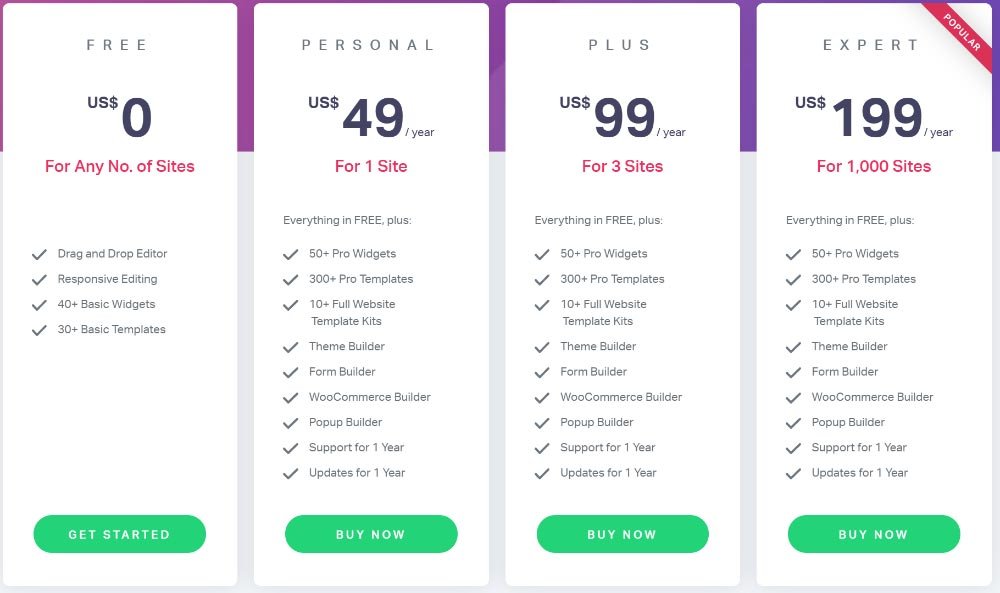
With elementor free you can create your website, you will get regualr updates. Elementor pro offers multiple subscription plan according to your need. Elementor pro is a subscription based plugin. Check out the prices below.

Keep check for this, Black Friday Deals coming soon

How to install Elementor Plugin

2. Beaver Builder

Similar to Elementor, Beaver builder is the wordpress website to create website visually. The free version has limited elements. If you need more elements to visually design your website. You need to buy Beaver Builder.

Also Check How To Create Backlinks For Free

How much beaver builder cost?

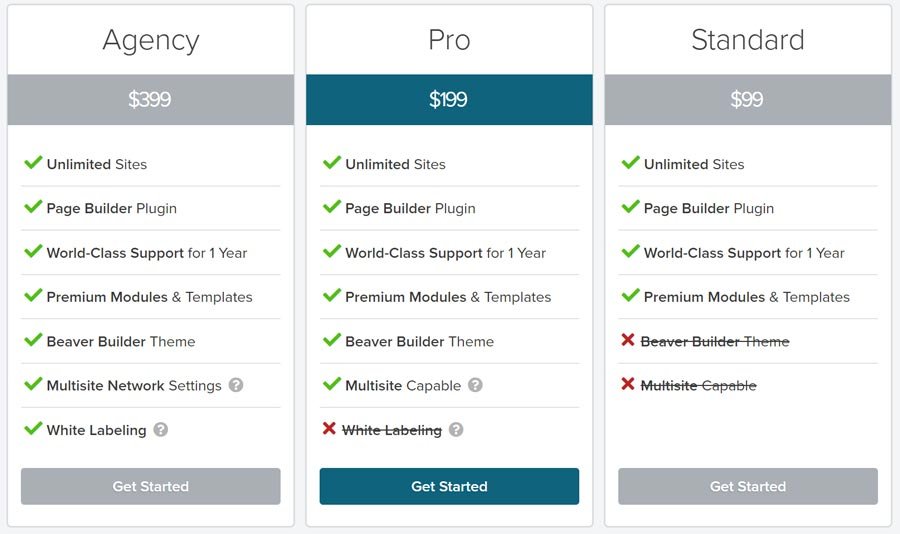
Whereas Elementor personal license is only for 1 website, You can use the Beaver Builder plugin for unlimited sites. Also the price for Beaver Builder is twice than elementor.

Beaver builder is easy to use. Just drag and drop the elements and you are done. It includes page templates in free version you just choose the page template according to your requirement and your page will be completed just change the content and you have a website.

How to install Beaver Builder?

3. Visual Composer

Visual composer is very good for creating website, this one is comparatively has more elements in free version but this effects the speed as it is not a lightweight plugin. It effects but not much.

It’s the best in terms of elements and editing them easily. It has already built templates for page you can easily use. If you want to buy visual composer has these license options.

You get free updates with free version. There are many add ons available for Visual composer.

4. Gutenberg – free page builder plugin built into WordPress

Gutenberg is built in wordpress plugin. It is block based page editor. If you are just beginning and not familiar with plugins and editors.

Gutenberg was introduced with wordpress 5 and has many elements for you to create your website. Though, it not handy as compared to others in the list.

This sums up the best free WordPress website builder you can use to design attractive websites and blogs.

Do I need a Page Builder if I am using the new WordPress Block Editor?

Well it depends on your requirement, either you don’t want to code or don’t know coding(maybe you are a good writer but not into technical stuff). If you can pay hire some freelancer for a basic setup. Or take help from youtube and use visual website builders. It is totally your choice.

also Learn Coding (It’s fun).

namecheap-domains

Why I Choose Namecheap For Domain Registration

When you search for cheap domain or low price domain or free domain, thousands of results show up. Which one you are gonna choose?

I have tried almost all top domain registrar. It may be Godaddy, Google Domains, Big rock, Hostgator and many more.

After trying all these, during renewal time I switched to Namecheap and still continuing with them.

Your Question is Why, when there are others who sell domains at cheap rates why go for Namecheap.

Easy Search and Beast Mode on Namecheap

You can easily search for domain on namecheap or you can use beast mode to choose domain, according to your industry as beast mode categorize domain according to the industry.

Cost And Privacy

So when I purchased my domain from Godaddy, I received multiple calls and emails from the website design companies, mediators. “Sir, You have purchased a domain do you need a Website” and frankly I was irritated. Almost no one provides the free Personal data privacy policy or Whois Guard Privacy so your data becomes public as you Buy A Domain.

But, Namecheap provides WhoisGuard Privacy Protection lifetime for free.

Also Read: Best Free Cloud Storage

namecheap

Support, Namecheap’s customer support is very professional and available 24×7 through chat. They are very experienced and fast in solving your problems.

Standing for what is right

It was Namecheap who was against the decision of ICANN removing price restriction on .org, .biz, .info.

Read the Full Article Here Help Keep Domain Prices in Check

How to Cultivate a Writing Habit: Unlocking the Power of Consistent Writing

So you started blogging. But you will have to write daily now, it’s very interesting when you are starting. You are all motivated and ready to work but it takes time to go viral. So you start to make excuses like I will do it tomorrow I am busy today(You can watch Netflix but for work you are busy).

Writing is a powerful tool for self-expression, creativity, and personal growth. However, many aspiring writers struggle to make writing a regular habit. In this article, we will explore practical strategies to develop a consistent writing routine. From setting goals to practicing daily exercises, we will provide practical tips to help you make writing an integral part of your life. Embracing a writing habit can unlock your full writing potential and offer numerous benefits along the way.

Start Reading Text

Watching videos to learn is very good you get information fast and it’s fun to watch video(fun to watch not easy to take action).

But when you are reading you focus on the style of writing, use of words and vocabulary, and if you find that article interesting you use the same tactics while you are writing something.

Write Reviews

Food Delivery:

Do you remember when zomato delivers an order and the delivery boy ask you to rate the delivery service. You start from right there, start giving honest opinions about the delivery service and quality of restaurant. You enjoyed the food or not, let the other party know what you think about the service, so that they can improve or be a little happy. Not a paragraph start with 4-5 lines describing the quality, quantity, experience. You can do it because you love eating and talking about food.

Restaurants:

When you pay the bill in a restaurant and the guy who was serving you asks you “how was it” or hands over a tablet or feedback form. Write what you like or didn’t like and if you liked, do recommend it to others.

Google maps:

You remember the time when you used google map to go somewhere and the place was moved to somewhere else. Write about that thing. Or you went to the right place write about that too. Write how to reach there, what to expect from the place, what to avoid and cost. Submit photos if you can. Google has a very cool feature like “Local guide” where you help others by giving reviews and you earn points and badges.

Start answering

Start answering on Question and Answer Websites like Quora, Ask.me, Answers.com and many more available. You can answer according to your knowledge and interest.

Heading 1: Set Clear Writing Goals

Setting clear goals is essential for building a sustainable writing habit. Define your objectives, whether it’s completing a novel, writing blog posts, or journaling for personal reflection. Break down your larger goals into smaller, manageable tasks, such as writing for a specific amount of time each day or completing a set number of words.

Heading 2: Establish a Consistent Writing Routine

Consistency is key when it comes to making writing a habit. Set aside dedicated time each day to write. Whether it’s in the morning, during lunch breaks, or before bedtime, find a time that works best for you and commit to it. Treat writing as an appointment with yourself and make it a non-negotiable part of your daily schedule.

Heading 3: Create a Writing Space

Designate a specific writing space that inspires creativity and focus. It could be a quiet corner in your home, a cozy cafe, or even a virtual writing environment. Ensure the space is free from distractions and stocked with writing essentials such as notebooks, pens, and a computer. Having a dedicated space signals your brain that it’s time to write and helps establish a writing routine.

Heading 4: Practice Daily Writing Exercises

To strengthen your writing muscle, incorporate daily writing exercises into your routine. These exercises can be prompts, freewriting sessions, or even rewriting passages from your favorite authors. The goal is to get your creative juices flowing and train yourself to write consistently, regardless of inspiration or topic. Regular practice builds confidence and improves your writing skills over time.

Heading 5: Embrace the Benefits of Writing

Writing offers a multitude of benefits beyond creative expression. Here are a few:

a) Self-Reflection and Personal Growth: Writing allows you to explore your thoughts, emotions, and experiences, promoting self-awareness and personal growth.

b) Improved Communication Skills: Consistent writing helps refine your communication skills, allowing you to express ideas more effectively in both personal and professional contexts.

c) Stress Relief and Emotional Well-being: Writing can serve as a cathartic outlet, providing relief from stress, anxiety, and emotional turmoil. It helps you process and make sense of your emotions.

d) Enhanced Creativity: Regular writing stimulates your imagination and nurtures creativity. It opens doors to new ideas, perspectives, and storytelling abilities.

e) Sharpened Critical Thinking: Writing encourages critical thinking and analysis. It challenges you to organize your thoughts coherently, supporting logical reasoning and problem-solving skills.

Heading 6: Celebrate Milestones and Progress

Celebrate your writing milestones and progress to stay motivated. Whether it’s completing a chapter, reaching a word count goal, or receiving positive feedback, acknowledge and reward your achievements. Small victories reinforce the writing habit and fuel your motivation to continue.

Conclusion:

Making writing a habit requires dedication, consistency, and perseverance. By setting clear goals, establishing a routine, creating a conducive writing space, practicing daily exercises, and embracing the many benefits of writing, you can cultivate a sustainable writing habit. Remember, the more you write, the better you become. So, start today and unlock the transformative power of consistent writing in your life.