Blog

Best Books for entrepreneurs

Best Books for entrepreneurs

Rich Dad Poor Dad

Name Of The Book: Rich Dad Poor Dad

Author:Robert Kiyosaki and Sharon Lechter

Copies Sold:  over 32 million copies

Why Read: The Book is about financial education, investing in assets, starting a business and growing your business. Writer tells about how you can become rich by right investments. Rich people don’t work for money, money works for them. How much do you earn doesn’t matter. How do you spend and invest that matters.

The book doesn’t teach you any tricks but it works around the earning, spending and investing habits.

You Can Sell

Every little thing matters.
If it matters, is it really little?
-Shiv Khera

Book: You Can Sell

Author: Shiv Khera

Other books you should read: You can win 

Why Read: YOU CAN SELL addresses principles which make a successful sales professional. Their are  no tricks in the book just the experiences of a professional salesperson. 

There are incidents about finding an opportunity and working through it

The Story of Two Shoe Salesmen in Africa

Once upon a time, a shoe company sent two salesmen to Africa to determine the market potential for their products. One salesman was sent to the east coast of Africa, while the other salesman was sent to the west coast of Africa. Both the salesmen completed a basic survey of the target market and called back to the office. The salesman sent to the east coast of Africa reported: “No one here wears any shoes, there is no market for us here!”. The other salesman sent a message “No one here wears any shoes, there is a huge market for us, send inventory fast!”

So there is a way of look at things and that’s all is discussed in the book.

The 7 Habits Of Highly Effective People

The 7 Habits of Highly Effective People is a self-improvement book. According the author how we see the world is entirely our perceptions and to change and improve our self we must change the perception.

Habit 1: Be Proactive

Reactive people blame the external circumstances, proactive people take responsibility of their actions. It is something like, blaming the Govt. for dirty road and not throwing the garbage anywhere. You can blame anything for your situation but deep down you know you are the only one to blame.

Let’s take my example:

I am not comfortable with writing, so i used to think:

1, If I can stay at home then i can write easily, because i have to work at the office and taking rest is very important.

2. If i get the office workstation I will write very easily

but after Covid-19 pandemic I had my pc at home and i was at home all the time but still I wasn’t writing. So i can’t blame the situation, timing, resources. There are many who don’t have a proper laptop, desktop, money to invest, not enough time because they have to work with their family but still they know their goal and work accordingly to achieve it.

“Winners find ways for their success; losers make excuses for their failure.”

Habit 2: Begin with the End in Mind

Know your goals and align your daily routine according to that. If you are clear and honest in your mind. You won’t fall in someone else’s trap. There are unlimited things to distract you form your goals but if you have your mind on your that one thing you want to achieve no one can distract you.

Habit 3: Put First Things First

Prioritize your tasks, do the things first which brings you closer to your goals. According to Alan Harper, Make a list.

For example: If you want to read a book

You need to buy a book first not bookmark.

If you know which one is priority then you can you invest your money, time and hard work accordingly.

Habit 4: Think Win/Win

Everything in life don’t need to be competition. We focus on making sure the other loses so that we can win. It’s a lose lose game not a win win. To find out what kind of personality you have observes your actions. If you are happy with the success of other and learn from it rather than getting jealous, you think in terms of win-win, other wise you know what do you need to change🤫


Habit 5: Seek First to Understand, Then to be Understood

“Don’t listen to reply, listen to understand”

First listen to everyone in the group, then make your point. Without understanding others and just saying what you want to say won’t make you the smartest person in the room. But it may create your negative image.


Habit 6: Synergize.

Combine or coordinate the activity, work in a group, every individual work differently and they get different idea to do the same task. So working together will bring the better result.

“Nobody Knows Everything, But Everybody Knows Something”

Habit 7: Sharpen the Saw

Spend time to improves yourself Physically, Mentally, Spiritually, socially and emotionally. You can wake up just one day and be the perfect person. Work daily on yourself and be better than the last day.


Start With Why
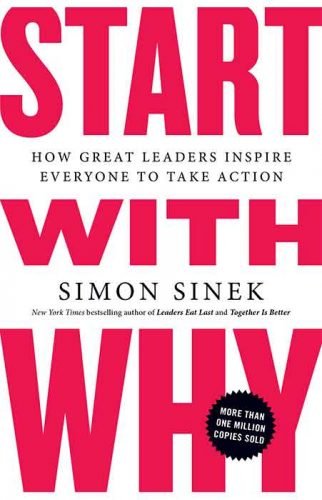
In Start With Why, Simon Sinek presents the idea that great leaders inspire others by putting the Why (the purpose) before the How (the process), or the What (the product).

You need to ask yourself first,

Why do you want to do this?

Why does you business exist?

Why should people care?

Clients comes to the which can Answer their WHY.

Suppose, I need a customized table with these functionalities.

Table should be fold-able

It mus have a power switch

It must have wheels to roll

and there are 3 brand I can go to and I choose one of them,

WHY?

because the one brand I chose is filling all my above requirements.


Lost And Founder

Book: Lost and Founder

Author: Rand Fishkin

Lost and founder by Rand Fishkin, Founder of MOZ, tells the story of founding his own company. From his website consultancy along with his Mother to becoming the CEO of MOZ. The book is a start up guide based on failures, reflection, and final success. 

The book is a personal tale of rand fishkin that makes it more interesting. 

Excerpt from the book

In 2001, I started working with my mom, Gillian, designing websites for small businesses in the shadow of Microsoft’s suburban Seattle-area campus. […] The dot-com bust and my sorely lacking business acumen meant we struggled for years, but eventually, after trial and error, missteps and heartache, tragedy and triumph, I found myself CEO of a burgeoning software company, complete with investors, employees, customers, and write-ups in TechCrunch.

 From the book Lost and Founder by Rand Fishkin, you’ll learn

Why choosing the wrong investors might tank your business;
What an honest and transparent office culture can do for your business; and
The dangers of shortcuts and hacks.

Zero To One
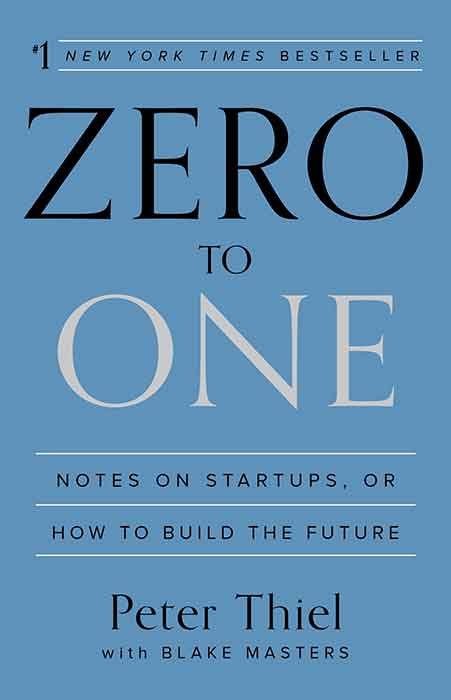
Zero To One is an inside look at Peter Thiel’s philosophy and strategy for making your startup a success by looking at the lessons he learned from founding and selling PayPal, investing in Facebook and becoming a billionaire in the process.

Going from zero to one means going from nothing to something. 

In Zero to One, Peter Thiel draws on his experience at PayPal and Palantir to offer ideas and suggestions for technology startups. Unlocking the power of innovation is the primary goal. In order to reach this goal, the entrepreneur will need to question conventional wisdom, embrace monopoly and capture value for their new enterprise.

How To Win Friends & Influence People

How To Win Friends & Influence People Summary

In the book Dale carnegie talks about the techniques of  handling people. Ways to make people like you. 

On dealing with people

When dealing with people, let us remember we are not dealing with creatures of logic. We are dealing with creatures of emotion, creatures bristling with prejudices and motivated by pride and vanity.

On influence

The only way on earth to influence other people is to talk about what they want and show them how to get it.

On the secret of success

If there is any one secret of success, it lies in the ability to get the other person’s point of view and see things from that person’s angle as well as from your own.

Must read this book if you want to increase your circle and want to increase your reach.

The 4-Hour Work Week

The 4-Hour Workweek is the step-by-step blueprint to free yourself from the shackles of a corporate job, create a business to fund the lifestyle of your dreams, and live life like a millionaire, without actually having to be one.

The 100$ Startup

The $100 Startup shows you how to break free from the shackles of 9 to 5 by combining your passion and skills into your own microbusiness, which you can start for $100 or less, yet still turn into a full time income, thanks to the power of the internet.

Think And Grow Rich

Think and Grow Rich by Napoleon Hill examines the psychological power of thought and the brain in the process of furthering your career for both monetary and personal satisfaction. Originally published in 1937, this is one of the all-time self-help classics and a must read for investors and entrepreneurial types.
For More Books and Giveaway Kindly Visit Pustak Padho

free cloud storage

Best Free Cloud Storage For 2020

What is cloud storage and best Free Cloud Storage providers?

In this digital age, keeping file safe and easily accessible is very important. Either you can keep an external hard drive with you all the time or you can try the cloud storage.

What is Cloud Storage? &#9729

Cloud storage is storage where you save your files and you can access it anywhere. You just need the internet to access the files.
There are many service providers who give free or paid cloud storage, which one you choose that depends on you.

Choose the secure and fast cloud storage because you may store personal documents or the heavy files which you need to access from different locations.

Check the Free Cloud Storage Provider For Best Experience While Accessing Your Files:

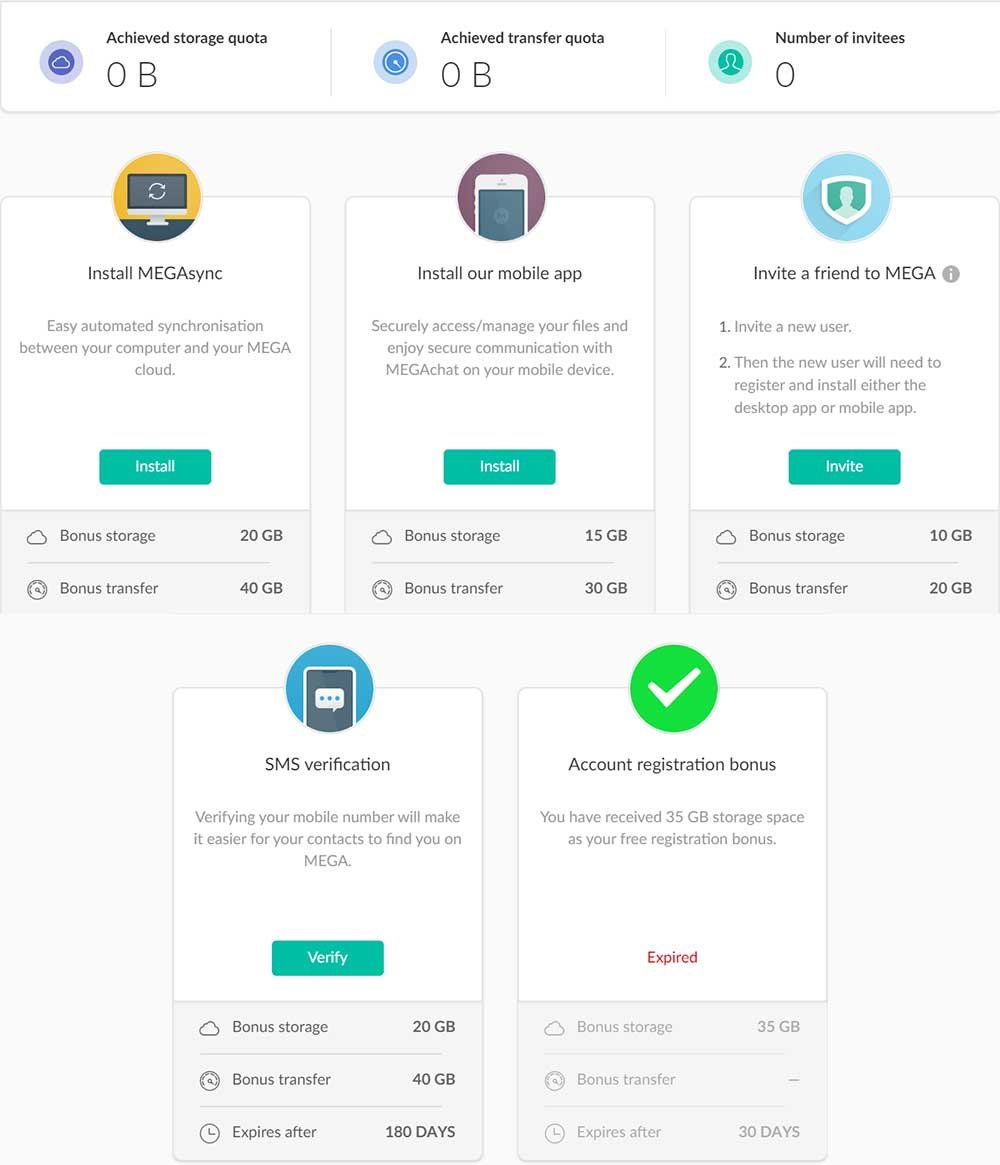
Free Space: 15 GB for lifetime, 35 GB as registration bonus for one month.

You can get more data by unlocking below achievements

  1. By inviting other users
  2. By installing mobile and desktop applications
  3. Purchasing storing from mega

These achievements come for a limited time. 

Check the image below for understanding the bonuses

Also you can purchase the storage if you want, Check the image below for Plans

Why I prefer Mega.nz: Uploading and Downloading speed is very fast. I can sync files between devices easily. I can refer others and get 10 data per user free for one year. Security: no one change password without security key.

Keep in mind, they provide you a security key while creating account, this key is used for resetting the password. if you lose the key you can’t recover the account and you can lose your data.

Google Drive

Who can Forget about Google when we are talking about cloud storage. Google drive is very good in terms of securing data. You can easily upload the data and access it anywhere.

Free Space: 15 GB

Mails, google photos and google drive data get counted in this. Your app backup is also counted in this.

Why choose google drive:

Easily access your data any where with google sync for desktop and google drive for phones.

Your only need your gmail account to switch between mail to drive.

If your e-mail attachment is larger than 25mb it will get uploaded to google drive and you can easily send a link.

You can insert image or files directly while sending mail with gmail.

You can create sheets, documents, slides, maps and many more things inside your google drive and easily carry it with you.

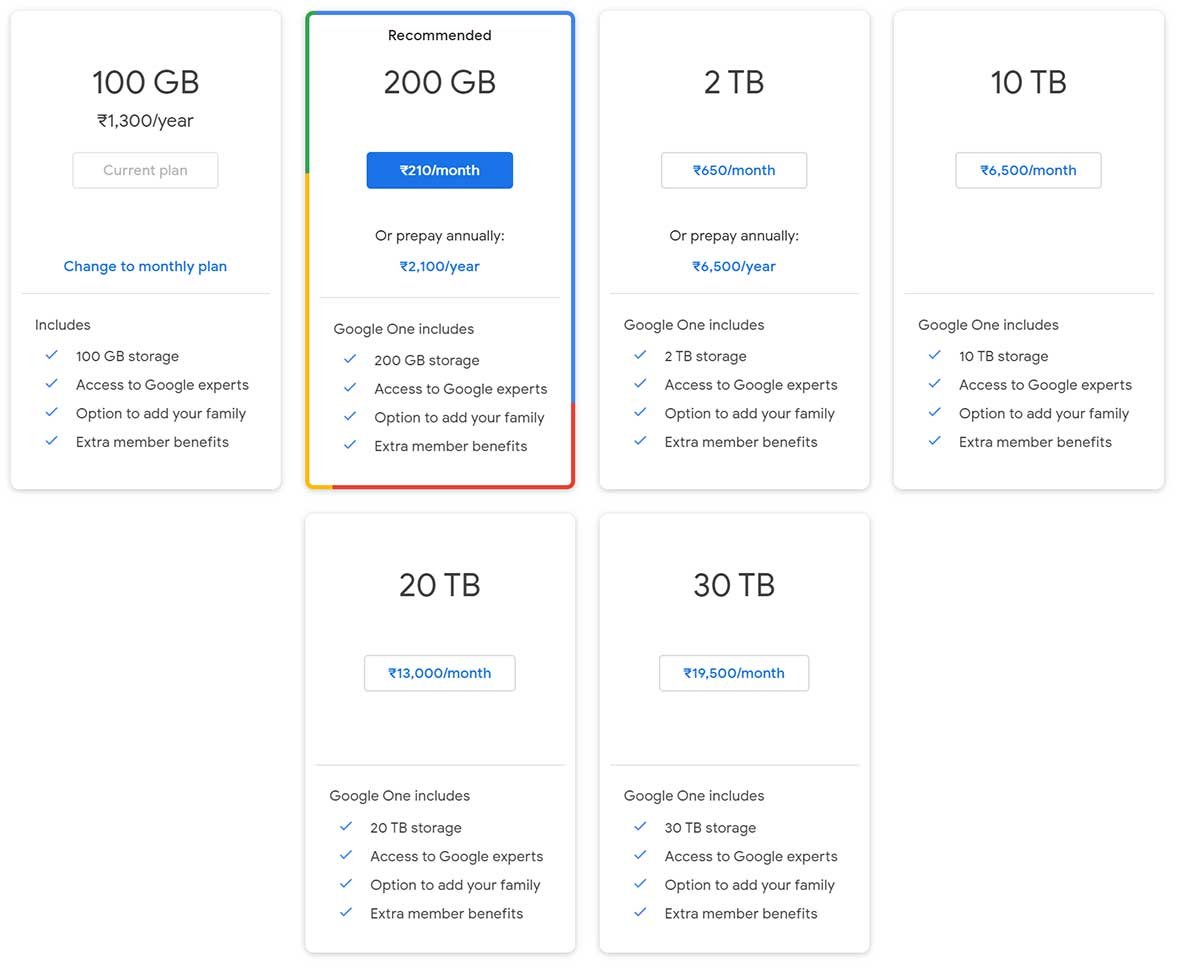
Google don’t give any referral bonus, if you need data more than 15GB you can purchase the google one membership. 

Check out the image below for storage plans

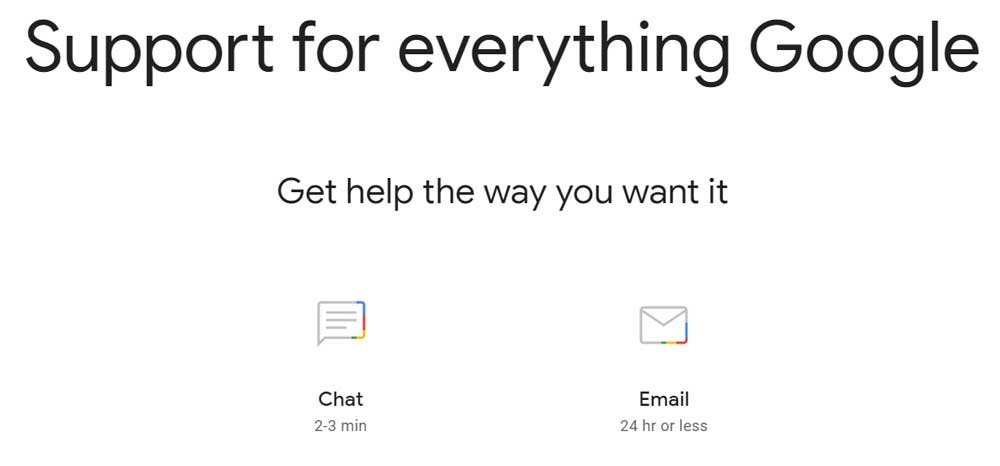
You will get some more benefits with google one membership like google chat and email support, time to time google credits

One Drive

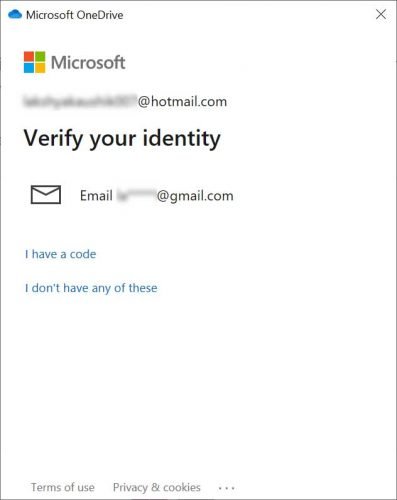
Free Space- 5 GB One Drive by Microsoft is awesome product. One drive is fast and it can easily sync with your pc or mobile and you can easily share the link to share your files. Best feature of one drive is Personal Vault, you can upload your files and lock the vault. To unlock the vault you need OTP from linked e-mail.
one drive personal vault
One drive provide free 5 GB storage only, you can upgrade to their plans if you need more storage you can easily upgrade to their plans. One drive also include Microsoft 365 office software in their plans.

Check out the image below for their plans.

one drive free space

Free Space- 2 GB

Dropbox is another cloud storage service. Dropbox provide 2 GB free data. You can referral bonus data upto 16GB. With the help of new feature called “Dropbox Paper” you can easily created well formatted documents inside dropbox.

You can transfer files over internet using “”Dropbox Transfer” but this is limited to 100MB if you are free user. By choosing professional plan you can’t send files upto 100GB.

dropbox file transfer
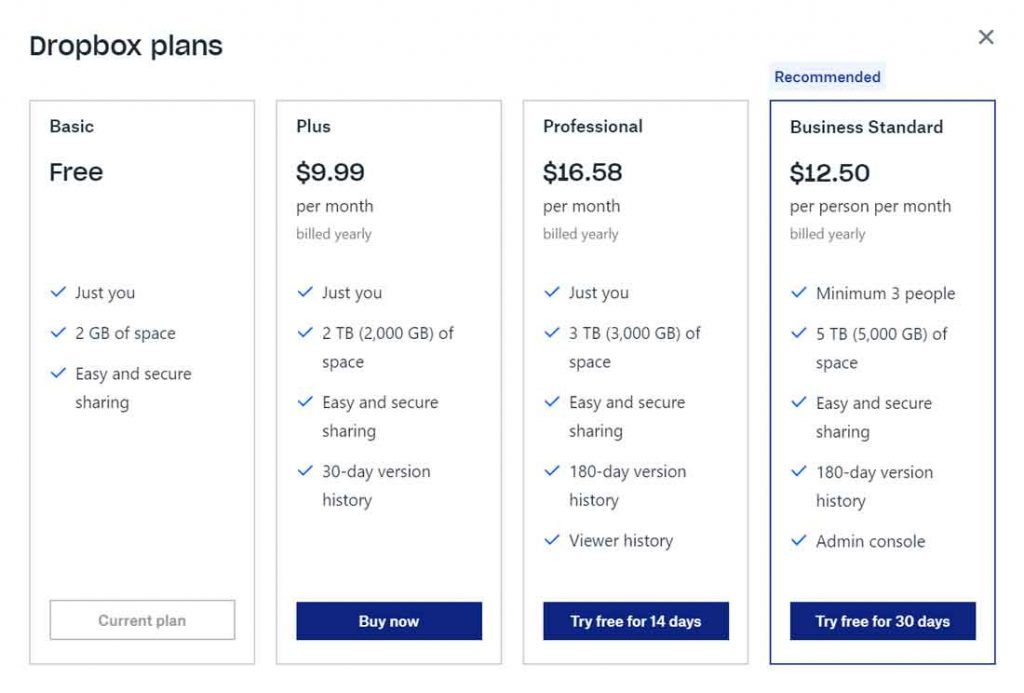
If you need more storage you can either invite your friends and get referral bonus or you can choose from their paid plans. Checkout their plans below.
dropbox free storage

Final thoughts: There are thousand of provider if you search for “free cloud storage”. But the above providers are best of my knowledge as I am using them from many years. They are very fast, secure and easily to handle. You can look for more or you can use these, your choice. Comment below if you have any doubt.

best web hosting india

Best Web Hosting for India in 2020

WHEN YOU DON'T INVEST IN INFRASTRUCTURE, YOU ARE GONNA PAY SOONER OR LATER
-MIKE PARKER

What is hosting/web hosting/server space🧐

Why do you need to purchase hosting?😦

Why you should avoid cheap hosting service?😱

What to Look for in a Web Host?🔍

Best Web Hosting Provider in India 👍

best web hosting india

What is hosting/web hosting/server space?

Two necessary things for a website are, Domain and Web Hosting. Domain is the address for your website eg. www.lakshyakaushik.in and web hosting is the storage where you keep your website files. It is similar to storage in your laptop/mobile/pc.

Why do you need to purchase hosting?

You need hosting to store your database and files, you need your website up all the time. You can’t put your files in your laptop and keep it on all the time. Here hosting providers come in play. They charge you some amount and give you the storage.

There are multiple hosting types like shared hosting, VPS, Cloud Storage, Dedicated Hosting.

Shared Hosting

In shared hosting, you share space with multiple website. Shared hosting is cheap and for low traffic websites, personal blogs. Other websites in the server may affect your website performance.

VPS Hosting

VPS hosting is a little better, you get part of a server which you can control on your own. VPS hosting is a little costly and best for small businesses, online store, large websites.

Cloud Hosting

Cloud hosting is the latest form of hosting. In cloud hosting resources of your website are spread at more than one location. So that cached pages are served as per your need. Cloud hosting is fast but costly. 

Dedicated Hosting

In dedicated hosting, you get the whole server to yourself. You need to have technical knowledge to manage it. Dedicated hosting is Costly but effective. It’s very much needed for big businesses.

Which hosting you choose depends on your website requirements. If you are beginning then I would suggest to go with Shared Hosting.

Why you should avoid cheap hosting service?

cheap web hosting india

There are thousands of cheap web hosting services available but you should avoid using these because of the following reasons. I have tried those multiple hosts and they are not worth it. Good hosting will cost you more money once in a year where as cheap hosting will cost you lesser money but more time and it may lead you to no revenue.

  • Poor Page Loading Speed

    Cheap web hosting service provider mostly provide shared hosting, which means server will be shared with more users which will lead to slow speed test

  • Impact On SEO

    Page loading speed is the valuable factor in SEO. If your page is loading slow, It will affect your website ranking.

  • Website Downtime Issues

    Cheap hosting services deal with downtime issues. If your website is down; it means you are losing the traffic and no one wants that.

  • Customer Support

    "You get what you pay for" Most of these hosting services do not provide dedicated Customer support and if you are a beginner and land in a problem you are gonna stuck with it.

  • Security

    Cheap hosting services do not provide better security. Which may lead to malicious virus or hacking of your website.

What to Look for in a Web Host??

  • Location

    Location of your hosting server matters for two reasons; one is speed and second is website ranking. If you want to rank a website in India and hosting company don't have a server in India, it will affect your website speed. And same goes for ranking your website. So keep in mind where do you want your website to rank and for that you need the server to your nearest location.

  • HDD Or SSD

    SSDs (Solid State Drives) are fast than the traditional HDDs (Hard Disk Drives). SSDs are expensive but they are much faster, reliable and consume less power. Speed is a ranking factor for websites, so you should go with the server which provides SSD

  • Storage

    if you are a beginner or have low traffic than you don't need unlimited storage 5-10 GB is sufficient for you. Don't use your hosting to store files. Use Cloud storage for this purpose.

Must Read: Best Free Cloud Storage In 2020

  • Bandwidth

    Bandwidth is maximum data transfer rate for your network. More the visitors, more will be the bandwidth usage. If your blog receives high traffic you should look out for high bandwidth plans, For beginners 100GB bandwidth (which mostly hosting service provide) plans are good to go.

  • Support

    Whether you are Coding Yoda or like charlie while using washing machine (an absolute beginner). We all need support time to time. So look for the service which provides live chat or have fast email support.

  • FTP

    You need FTP to upload files, you can use cpanel for uploading files but FTP is far better in terms of handling the files. You just need a login and all your files will be in front of you. Look for the provider who supports and provides FTP.

  • Upgrade

    In near future your website will grow and so the resources. So choose a host with whom you can easily upgrade with ZERO or minimal downtime.

  • Backup

    Accidents happen; and so that you don't suffer if something happens with your website, you should look for the host which provides automatic backups. Some hosts charge for backup service. You can buy it or you have to backup manually.

Best Web Hosting For India In 2020

Server Locations: USA, Asia and Europe (UK)

Price: 59Rs. (single web hosting)

Why Choose Them: I am using their hosting for last 2 years and I never had a problem. Their support is awesome. You can directly chat or you can leave a mail and they are super helpful. Their plans are low cost and if you are a beginner you can start as low as 59 Rs. per month for shared hosting. Check the image below for all the details you need.

SSL: If you add multiple domains in Premium plan you will have to buy separate SSL certificate for each domain

Bonus Tip*- Talk to them before placing the order, you may get some offer or discount.

hostinger web hosting price

Server Locations: USA, UK, Netherlands, Germany, Australia, Singapore

Price: 3.95$ Rs. Basic Plan For Single Website Hosting

Free Cloudflare CDN and Siteground Super Cacher Caching plugin

Renewal Price is almost 3 times

Why Choose Them: Siteground hosting is a little costly but they are best in market and recommended by me, WPBEGINNER and WORDPRESS. My only reason for choosing them is their server speed. If you need just one website, their Startup plan is very good but if you hope to create more then Grow big plan is very suitable for you.

Choose them wisely because they are very good with services but their renewal rates  are very high. So work hard and try to cover the hosting charges with your blog/website/business within a year (if you opt for 1 year hosting).

SSL: Siteground provides Let’s Encrypt SSL, if you choose Siteground Grow Big Plan then you can add multiple domains with free SSL.

siteground hosting price

Server Locations: Provo, Utah and Houston, Texas, 23 more data centers available if you activate CLOUDFLARE. 

Server Locations For India:  Mumbai, Hyderabad, Karnataka, and Singapore

Price: Price is more if you choose Indian data center but your website will be fast. Prices go down if you increase the duration. 

Single Web Hosting starts from 159Rs. per month if you choose for one year.

They have 4 hosting plans: STARTER | HATCHLING | BABY | BUSINESS

Starter and Hatchling are for Single Domain Use, starter plan has 10GB storage and 100GB bandwidth.

Hatchling has unmetered storage and bandwidth. 

Hostgator  includes free SSL certificate in all their plans. 

Support: Hostgator support is very good, you can contact them via chat, call and email.

Server Locations: Chicago, Phoenix, London, Amsterdam, Sydney, Tokyo

Server Locations For India:  Nearest one is Singapore

Price: Starter regular price is 4.95$, Current promotional price is 2.95$

Starter plan is for single domain, it comes with unlimited SSD space and Unlimited bandwitdth.

Best thing about them is they give Free Domain with Every Hosting Plan.

SSL: Their every plan includes Let’s Encrypt SSL

They have 60 Days money back guarantee.

For Support You can Contact via call, chat or email. They are super fast in reply and very supporting. 

If you need to upgrade your hosting from shared to Cloud, VPS or any one; their technicians will do that without any cost.

Check out their hosting plans

Conclusion:  The above hosting providers are best as I have tried. You can try these or you can choose yourself but look for the one with whom you can go for a long time so that you don’t have to change host and it doesn’t affect your business.

Bonus Tip: Must contact sales or support once before purchasing and tell them your requirements and ask if any offer is going on. I am sure they will help you out.

What are backlinks? How To Build In 2020

What Are Backlinks?

Why do you need them?

How to create and How to check ?

Have you seen those links on websites which take you to another website? Good, now let’s talk about them.

Backlinks are the links through which you connect to other person or brand’s website.

It is similar to real life where one person connect to other through some medium.

They help you in ranking. Search engines count them as votes, more the votes, higher the ranking.

INBOUND LINKS: Links pointing to your website from others. You need more quality inbound links to rank higher.

OUTBOUND LINKS: Links pointing to others website from your website.

WHY DO YOU NEED BACKLINKS ?

They play a very good role in SEO for your website.

They help in creating authority of a domain (DA)

For example, if you need an interior designer and ten people recommend same person or business you will be more comfortable than one person recommending a business.

Similarly more* the backlinks more the domain authority.

MORE BACKLINKS MEAN MORE DOMAIN AUTHORITY??

Not at all, creating backlinks doesn’t mean just creating quantity random links with directory submission or purchasing from random sources. It is called spamming and google may penalize or stop indexing your website.

Quality of backlinks matter rather than quantity. Hundred links from one website are not as good as one link from hundred websites.

NOFOLLOW Vs DOFOLLOW BACKLINKS

NOFOLLOW BACKLINKS: No follow links are the links which play a minor role in SEO. They don’t help in ranking and they ask search engines to not give any value to that link.

Below is the example of nofollow html tag

<a href=”https://www.example.com/” rel=”nofollow”>Link Text</a>

DOFOLLOW BACKLINKS: Do follow links are the one you need the most. Quality dofollow links help in higher website rank, increase your domain authority, get traffic and build trust in your brand.

<a href=”https://www.example.com/” >Link Text</a>

So why there is NOFOLLOW Backlinks, nofollow invented to stop comment spam. Google ask users to use “nofollow” for paid links.

but, still nofollow can help you in generating traffic, search engines will bypass the nofollow links but users can see the link and may go to your website.

You can check if the link is dofollow or nofollow in your browser:

Checkout the below steps


HOW TO CREATE QUALITY BACK LINKS FOR FREE?

Write quality content to increase your reach so that more users automatically connect to your website.

Google: Search for articles on you niche which are ranking well, then improve the post and write more about the topic, You may create video for the topic and add it to your post.


GUEST BLOGGING: Write blog post for others within your niche to get inbound links.


SOCIAL MEDIA PROFILES: Put your website link in your business pages details.


Promotion:Contact influencers in your niche or industry and tell them about an article on your site that they may want to link to.

HOW TO CHECK BACKLINKS:


There are many websites available to check, but the most I trust is 

Just enter your domain and click on search and it will show you the list of backlinks with details like links are dofollow or nofollow and how many domains are referring your website.

Tips:

Don’t lose your authority by spam backlink.

While using outbound links must check that the Domain Authority of website you are linking to.

Don’t use shortcuts, purchasing backlinks is easy but not reliable.

Keep Researching and writing, if your content is better you will automatically go up.

Keep Learning | Happy Backlinking

Xiaomi MI Truck Builder Kit and Manual

Xiaomi Mi the largest manufacturer of mobile and gadgets now trying their hands in the Toy market, Xiaomi Launched there Truck Building kit. Xiaomi MI Truck Builder Building Kit Crowdfunding is already going on and it has already collected 115% of the amount. And 6 days still remaining to complete the crowdfunding campaign. According to Mi India Shipping will commence from 25th July. On official website, price is 1799 inr , Currently they are giving 17% off so the price for now is 1499rs.

Xiaomi MI Truck Builder Kit and Manual

The kit contains 530+ parts. By using these you can Create A truck or Bulldozer. The material is said to be high quality and environmental non-toxic. It has steering wheels and bucket lifting system.

mi bulldozer
It is suitable for kids Age 6 and Up. It weighs around 600g.
The Mi truck builder kit has a great directional control system.  the steering wheel is able to control the direction of the truck and path of travel.
kid playing with mi truck builder
Xiaomi MI truck builder can be converted into 2 models. One is Truck and second is builldozer. If you are stuck somewhere you can use the Manual that comes with it. You can remove the parts and assemble them again. It takes around 5-6 hrs. to complete and start having fun.
Package Contains: 6 rubber wheels, 5 block packs, 1 user manual, 1 building instruction manual.
 
You can order from MI India. Click on the button below to BUY NOW
WARNING:
CHOKING HAZARD – Small parts. Not for children under 3 yrs.
 
Image credit: Mi India, Mi Us
*All images used are of their respective owners

What is blogging and How to start blogging?

What is a Blog?

How to Start a Blog?

Best Blogging Platforms

Can you earn from blogging?

Can you do full time blogging?

Blog is an online journal where you write about anything to share the information with others. It may be about any product, service, how to tutorials, health and fitness, food, travelling. It may be anything you like or passionate about. Blog is a website but the content is updated almost regularly on blog as compared to a brand website.

The person who write a blog is called blogger, it may be a single person or a group with their own separate roles like writer, moderator, technical guy and so on, bigger the blog more the roles.

the history of blogging goes around 1994 but as the online market started growing. there was growth time to time blogging was easy that time but around 10-12 years ago interest towards blogging has increased.

blogging image

How to start a Blog?

Starting a blog is very easy. You don’t need any technical knowledge, you just have to research for the things you need. If you are beginner, to start a blog, You just have to choose a name for you blog and you are ready to go. And if you are a little advance you need to Buy custom Domain (.com, .in and many more are available)and Hosting (to store your files).

Where to start blogging for free??

wordpress vs blogger

1. Blogger

Blogger is a blogging platform by offered by google. You can login with your Gmail account and Create a blog easily. Just choose the blog name and you are ready to go. Blogger gives you a subdomain.

Example: yourblog.blogspot.com

blogger have a very simple interface to manage your blog. You don’t need any separate login for anything. Just one login and you are in, you can change your layout and design from here. There are many templates available using them you can change your design. You can also download or buy themes easily from internet.

Blogger template format is XML, you can simply upload the theme and you are ready to go or you can work around a little bit to achieve the result accordingly.

Benefits of Blogger

1. Easy to manage- Blogger is very easy to manage because of it’s simple interface. You can change the design or layout without any technical knowledge or coding.

2. No storage Needed- Blogger don’t need any storage space to keep your files you can directly upload the content it.

3. Custom Domain- Your can add you custom domain and it will redirect to your blog.

For example: thebrownbag.blogspot.com will be shown as thebrownbag.com

4. Speed and Security- speed and security in blogger is not something you have to look for. Google already takes care of it. You just have to take care of the content and it will all be good.

Overall blogger is very very good if you are just a beginner. Only one thing you need is better content.

2. WordPress.com

WordPress is also a blogging platform. WordPress is a content management system (CMS) build with php and mysql. Around 34% of websites are on wordpress. WordPress is more advanced than blogger.

Like blogger You will also get free sub-domain here.

Example: yoursite.wordpress.com

 you may need to learn a little coding if you are working with wordpress. WordPress.com is free till you are working on basic blogs but if you need some advanced functions you may have to purchase a plan. WordPress plans go from 200rs. per month to 800rs. per month. In this you get a free domain and many more features like free themes, customer support.

In wordpress you have a little more freedom to design you blog in a better way. You can use plugins as per your need. If you want to make a professional blog you may self host it.

WordPress has two type of blog platforms.

WordPress.com Vs WordPress.org

for wordpress.com you only need email address to create an account. But for wordpress.org you need a domain and hosting space to host your website and manage. You can install themes and make your website look good.

Both blogger and wordpress are widely used for blogging. But wordpress is more professional more advanced. If you need a basic blog you can use blogger.com but if you are looking for a professional blog and want to do blogging as your passion you must use wordpress.

Can You Earn From Blogging?

Well short answer is yes. But for that you will have to work hard. There are many factors on which your earning depands.

1. Content is King- you content must be good, you must give value to your visitors. To make your content better you will have to Research for the Question you can answer better then the others. Your article should have 2000-5000 words describing the topic clearly.

2. Design- Your blog design must be very attractive, so that the visitor is attracted towards it and stay for much time. Your blog should be clean and layout should be good so that visitor can find what he is looking for ,easily.

3. Speed- Your blog should be fast to show content. Maximum time should be between 2-3s. If your blog is slow visitors will go back and it will increase your Bounce Rate* which is not good at all

4. Language- You should write in the language in which your are comfortable but If you are writing for you local region then you should write in your local language but if you are going global then your language should be English.

5. Value to the users-  Your content should give the answer visitor is looking for, if you are just making up stuff about the topic it won’t be helpful for visitor and visitor may not visit your blog again so you should make valuable content.

Research is very much needed element in the blogging whether it is for purchasing a domain name, topics for your blog, keywords for your article.

Which blogging website is best?

Both Blogger and WordPress are good in there own way, if you are a beginner and don’t have money to spend you can go with blogger, but Wordress is more advanced and it gives you more freedom. Basically it is you choice to go with either one according to your understanding. My personal choice is WordPress.

Can You Do Full Time Blogging: 

Yes you can do full time blogging but before going to full time you must earn to survive for next one year. Because you are going to frustrate eventually so you must save so that you can survive if you don’t have a job. you can start working part time for some time till you setup your blog so that you can earn and give time to your blog. But you will have to be honest to yourself.

Before leaving your job ask this to yourself:

Do you really want to do this or you are just trying this because you are frustrated with your JOB ?

Are you willing to give your maximum time working on it ?

What if this don’t work out soon, what will I do Then, keep trying or go back to the job ?

Thing You Must do

1. You must have patience for the better results, if you think you will write a few posts and you will start earning, that won’t happen, you will have to keep working on your writing, your blog design and speed.

2. To make writing your habit, start by little like register for google guide and write reviews for places to visit, write reviews on food apps like zomato, swiggy, food panda.

 Start answering on Quora, Reddit and many more.

3. Read books as much as you can.

4. Learn to manage your time and make a schedule of the tasks every night you have to do tomorrow.

Android Versions and How to find Android version of your phone

Android Versions and How to find Android version of your phone

The Beginning:

Android is a mobile operating system, Developed by Android Inc. in october 2003, in Palo Alto California by Andy Rubin, Rich Miner, nick sears, chris white. It was created for digital cameras and pitched to investor in april 2004, but market for cameras was not big enough so five months later the idea was pitched as android operating system, it was operating against Symbian and Microsoft windows mobile.

Android is based on a modified version of Linux kernel and other open source software,
Google bought it in 2005 android came in market in 2007. First commercial android device launched in october 2008, Googel has created many versions of android for multiple devices lie Android TV for televisions, Android Auto for car, wear os for wrist watches

Android is also associated with google for GMS (Google mobile services), which comes pre installed on devices. Applications like Gmail, Google play and Google play services, Google Chrome and google search app.

Android is the best selling operating system since 2011 on smartphones and on tablets since 2013, According to reports, it has over two billion monthly active users. largest for any operting system. Google play store has 2.6 million applications.

When Google bought Android Inc. its key employees, rubin miner and white joined google.

At first phone launced by google was similar to blackberry phone without touch screen and physical QWERTY Keyboard . Later google announced that touchscreen will be added because apple came into the market.

The main hardware for android is ARMv7 and ARMv8-A, formerly also ARMv5.

Required RAM for Android range from 816MB-1.8 GB for 64 bit and 512MB-1.3GB for 32 bit.


Versions of Android:

Android code names are confectionary themed and in alphabetical order since Android 1.5 cupcake which was launched in 2009

First Android commercial device was HTC dream


First android
Froyo
Jellybean
Nougat
Cupcake
Gingerbread
Kitkat
Oreo
Donut
Honeycomb
Lollipop
Pie
Eclair
Ice-Cream Sandwich
Marshmallow
Android 10

Versions Of Android:

Android Q is the 10 major version of the android operating sytem. It was announced by Google on March 13, 2019 and it’s first beta was released on the same day. Second beta was released on april 3, 2019 and third was released on 7 may 2019, fourth beta June 5 with final APIs and SDK.


On July 10, 2019 Beta 5 was released with candidate testing. It is available on pixel phones by google.


How To Know Your Android Version:

If You want to know your Android version. Watch the Video

Contact If your need any help

The Top Freelancing Websites in India: A Comprehensive Guide

Freelancing has gained immense popularity in recent years, providing individuals with the freedom to work on their terms and earn a decent income. In India, the freelance market is thriving, with numerous platforms connecting talented professionals with clients worldwide. If you’re looking to kickstart your freelancing journey, this article presents a roundup of the best freelancing websites in India, along with their rankings, payment types, earning potential, and tips on how to secure projects.

Ranking of the Best Freelancing Websites in India:

RankingFreelancing Website
1Upwork
2Freelancer
3Fiverr
4Guru
5Toptal

Upwork:

Upwork is the most popular freelancing website in India, connecting millions of professionals with clients worldwide. It offers a wide range of job categories and has a robust rating system that helps clients find the right talent. Upwork operates on a bidding system, where freelancers submit proposals and negotiate rates with clients. Payment types include hourly or fixed-price contracts. The earning potential on Upwork varies based on skills and experience, with some freelancers earning well over ₹1,00,000 per month.

Freelancer:

Freelancer is another prominent platform in India that offers a vast range of freelancing opportunities. It operates on a bidding system, similar to Upwork, where freelancers compete for projects. Payments on Freelancer can be made via hourly rates or fixed-price contracts. The earning potential on Freelancer varies widely, depending on the niche and the freelancer’s expertise. Some successful freelancers on the platform earn upwards of ₹80,000 per month.

Fiverr:

Fiverr has gained popularity as a platform that focuses on micro-jobs or gigs. Freelancers create profiles and offer their services in various categories such as writing, graphic design, programming, and more. Fiverr allows freelancers to set their own prices, starting from $5 (approximately ₹350). The payment structure on Fiverr is primarily based on fixed-price contracts. Earnings on Fiverr can vary significantly, but with the right marketing and excellent service quality, freelancers can earn a substantial income.

Guru:

Guru is a freelancing website that connects professionals with clients across various industries. It offers a range of job categories, including IT, design, writing, marketing, and more. Freelancers on Guru can choose between hourly or fixed-price contracts for their projects. Earning potential on Guru depends on the freelancer’s skillset and experience level. Successful freelancers can earn an average of ₹50,000 to ₹1,00,000 per month.

Toptal:

Toptal is an exclusive freelancing platform that caters to top-tier professionals. It rigorously screens and accepts only the top 3% of applicants, ensuring high-quality talent for clients. Toptal focuses on connecting freelancers with clients requiring specialized skills in software development, design, finance, and more. Payments on Toptal are typically made on an hourly basis, with rates varying depending on the expertise. Earnings on Toptal are generally high, with freelancers earning anywhere from ₹1,50,000 to ₹4,00,000 per month.

How to Get Freelancing Projects:

Build a compelling portfolio:

Create a portfolio showcasing your skills, experience, and past projects to attract clients.

Optimize your profile:

Craft an appealing profile that highlights your expertise and showcases your unique selling points.

Submit high-quality proposals:

Write personalized, tailored proposals for each project, addressing the client’s requirements and demonstrating your suitability for the job.

Network and market yourself:

Leverage social media platforms, attend industry events, and engage in online communities to expand your network and gain visibility.

Provide excellent customer service:

Deliver high-quality work, maintain clear communication with clients, and strive for customer satisfaction to build a positive reputation.

Conclusion:

With the surge in remote work, freelancing websites in India have become go-to platforms for professionals seeking flexible work opportunities and clients looking for skilled talent. Upwork, Freelancer, Fiverr, Guru, and Toptal are among the top freelancing websites that offer diverse job categories and payment options. By honing your skills, optimizing your profile, and effectively marketing yourself, you can tap into these platforms to earn a substantial income and achieve professional growth. Happy freelancing!

Internet download manager: A Comprehensive Review

In today’s digital age, where speed and efficiency are paramount, downloading files from the internet has become an integral part of our daily lives. Whether you’re downloading large software applications, HD movies, or essential documents, having a reliable download manager can significantly enhance your experience. One such popular tool is Internet Download Manager (IDM). In this article, we will explore the key features, benefits, and pricing options offered by IDM.

What is Internet Download Manager?

Internet Download Manager, commonly known as IDM, is a powerful download accelerator that helps users manage and speed up their file downloads. With IDM, users can effortlessly download files from the internet while enjoying faster speeds, improved stability, and the ability to pause and resume downloads.

Pros of Internet Download Manager:

  1. Accelerated Download Speeds: IDM uses intelligent dynamic file segmentation technology that divides downloads into multiple parts and downloads them simultaneously. This approach optimizes your network utilization and can significantly increase download speeds by up to five times.
  2. Schedule and Queue Downloads: IDM allows you to schedule downloads at specific times, making it convenient for users who want to download files during off-peak hours or when they are away from their computer. Additionally, you can queue multiple downloads and prioritize them according to your preference.
  3. Resume and Recovery: IDM provides a convenient resume capability that enables users to pause and resume downloads at any time, even if the internet connection is interrupted or the computer is restarted. This feature eliminates the frustration of starting downloads from scratch.
  4. Advanced Browser Integration: IDM integrates seamlessly with popular web browsers such as Chrome, Firefox, Edge, and Safari. With this integration, IDM automatically captures download links, giving you the option to download files directly from the browser with just a click.
  5. Multilingual Support: IDM supports multiple languages, making it accessible to users worldwide. The user interface is available in more than 30 languages, ensuring a comfortable experience for non-English speakers.

Pricing and Benefits:

Internet Download Manager offers a free trial period of 30 days, allowing users to explore the software’s features and evaluate its effectiveness. After the trial period, users have the option to purchase a license for continued access to IDM’s premium features. The pricing is affordable and varies based on the number of PCs you wish to activate the software on.

The benefits of purchasing a license include:

  1. Full Access to Features: With a licensed version, you unlock the full potential of IDM and gain access to all its features, including download acceleration, scheduling, browser integration, and more.
  2. Lifetime Updates: IDM provides free lifetime updates to its users. This means that whenever there are new features, bug fixes, or improvements, you can easily update your IDM version without any additional cost.
  3. Premium Customer Support: Licensed users receive priority customer support, ensuring timely assistance with any technical issues or queries.
  4. Ad-Free Experience: Unlike the trial version, the licensed version of IDM eliminates all advertisements, creating a seamless and distraction-free download experience.

Conclusion:

Internet Download Manager is a versatile and reliable tool that enhances the download experience for users across the globe. With its accelerated download speeds, resume and recovery capabilities, and advanced browser integration, IDM provides a comprehensive solution for managing and optimizing file downloads. The pricing options, including a free trial and affordable licenses, make IDM an accessible choice for users seeking faster and more efficient downloads. So why not give IDM a try and unlock the true potential of your downloading capabilities?

4 Blogger Tips You Must Know

Blogger is the best platform for creating a blog.

You can create a blog as easy as creating email address, you just have to choose the name and publish it. Below are some Blogger Tips You Must Know to keep your content secure from copying.

We Will be Working on

Keeping your image private so no one can copy that on there blog.

You will see how to disable right click in blogger with a small script.

You will learn how to disable image dragging.

You will know how to remove preloader gear icon

Turn Off Gear Loading Icon in Blogger

If you’re using the new Blogger interface: Go to Dashboard – Theme- Customise – Advanced – Add CSS – paste the following code – Press enter after the last character of the last line } – Apply to Blog

.ss,.blogger-gear{
display: none;
}
turn off gear icon in blogger, preloader

Disable Image Dragging

Go to template and edit html. Search </head>

Now you will see <body with a something more code after it so you have to paste the below code right after it. The code will look like in image

ondragstart=’return false’ onselectstart=’return false’

disable image dragging in blogger

Disable Right click On blogger

We will use this to disable right Click on blogger and securing text from copying.

 Click in Code and Press Ctrl+F type <head> Paste the Code after the <head> tag then click Save template button.

<script type=”text/javascript”>
//<![CDATA[
function nocontext(e) {
var clickedTag = (e==null) ? event.srcElement.tagName : e.target.tagName;
if (clickedTag == “IMG”) {
alert(alertMsg);
return false;}}
var alertMsg = “Image context menu is disabled”;
document.oncontextmenu = nocontext;
//]]>
</script>

disable right click in blogger

Change alert message here

disable right click on blogger alert message

Also Visit: How to Convert PDF To Text

Disable image opening on click

We need this to secure our image from right clicking and opening in new tab.

STEP 1:

Open up your post editor and create a new post (this will work on old posts as well) and add an image.

STEP 2:

Click on the image. This will highlight the image.

STEP 3:

Click on “Link” to remove the link from the image.

remove link from image

You must know these Blogger Tips to run a successful blog.